AI Agents
Chatbots
An LLM (Large Language Model) is only capable of predicting upcoming text, given an input. We can think of it as a person stuck in an empty room. While they are able to ‘speak’, they cannot perform actions or research new information. To make LLMs useful, we need to bridge the gap between the user, the LLM, and the world around us.
The simplest way to interact with an LLM is through a chatbot. This is how the early versions of ChatGPT worked, and the most common way people use LLMs today.
To generate a response, the user first provides a prompt, or request. The LLM then receives this request and generates an answer based on its internal knowledge (weights), learned at the time of training. The inner workings of an LLM are explained in a previous note.
Creating a chatbot is extremely simple, and can be done in just a few lines of code:
from openai import OpenAI

client = OpenAI(base_url="http://localhost:1234/v1", api_key="your-key")
messages = [{"role": "system", "content": "You are a helpful chatbot."}]

while True:
  messages.append({"role": "user", "content": input("You: ")})

  reply = client.chat.completions.create(
    model="local-model",
    messages=messages
  ).choices[0].message.content

  reply = (reply or "").strip()
  messages.append({"role": "assistant", "content": reply})
  print("AI:", reply)

This example works with any OpenAI-compatible LLM provider, such as Ollama, LMStudio, OpenRouter, and many more. For the model to be aware of previous context, the entire chat history is sent over the API every time a new message is received.
Tools
While chatting with an AI is already useful, a chatbot can’t perform actions, research, or code on its own. To bridge this gap, we can give the model tools.
A tool is an external program the LLM is able to access. In our previous example, where the LLM is in an empty room, this would be the equivalent of giving it a watch to tell the time, or a computer to research with. The challenge is to perform actions through language alone. Luckily this has already been solved through terminals and CLI programs, so it’s trivial to route LLM responses to the system’s bash, and add any other tool the LLM might need:
import json, subprocess
from openai import OpenAI

client = OpenAI(base_url="http://localhost:1234/v1", api_key="your-key")
messages = [{"role": "system", "content": "You are a helpful chatbot."}]

tools = [{
  "type": "function",
  "function": {
    "name": "run_bash",
    "description": "Run a bash command and return stdout and stderr.",
    "parameters": {
      "type": "object",
      "properties": {
        "command": {"type": "string", "description": "The bash command to run."}
      },
      "required": ["command"],
    },
  },
}]

def run_bash(command):
  result = subprocess.run(command, shell=True, text=True, capture_output=True)
  output = result.stdout + (f"\nSTDERR:\n{result.stderr}" if result.stderr else "")
  return output.strip() or "(no output)"

while True:
  messages.append({"role": "user", "content": input("You: ")})

  while True:
    response = client.chat.completions.create(
      model="local-model",
      messages=messages,
      tools=tools,
    )

    message = response.choices[0].message
    messages.append(message)

    if not message.tool_calls:
      print("AI:", (message.content or "").strip())
      break

    for tool_call in message.tool_calls:
      if tool_call.function.name == "run_bash":
        command = json.loads(tool_call.function.arguments)["command"]
        print(f"BASH: {command}")
        messages.append({
          "role": "tool",
          "tool_call_id": tool_call.id,
          "content": run_bash(command),
        })

This example uses OpenAI’s API, which acts as a compatibility layer between different models and our script. The model itself may perform tool calls in slightly different ways. For GPT models, a tool call is often a tiny piece of JSON with a list of tool names and arguments to pass to them:
<tool_call>
{"name":"run_bash","arguments":{"command":"date"}}
</tool_call>
Skills
Tools can be powerful, but unless the model was already trained to use them, it might not know how a tool works or how to use it effectively. To solve this problem, there are sets of Markdown (.md) documents, standardized as skills.
In practice, a skill might contain:
skill/
  SKILL.md        # instructions for the model
  examples/       # example inputs/outputs
  scripts/        # helper code the model can run
  templates/      # reusable document/code templates
Skills can be any text for any purpose, from tutorials on how to use a tool, to sets of instructions, to user preferences and information. Generally, skills describe workflows: When to use a tool, what steps to follow, and what to do with the result.
LLMs can generate their own skills if instructed to do so, but it is common to obtain pre-made skills on open repositories such as skills.sh.
MCP
While skills and tools allow an LLM to perform tasks, we sometimes want to interact with services outside of our machine. Applications such as Notion, Gmail, Todoist, and many others are available online, but don’t have a CLI tool the AI could use. Instead of every AI program (harness) needing its own tool for every service the user may want to connect to, or having to give the LLM a full computer with a bash session, MCP (Model Context Protocol) was created as a universal standard.
To access a service, the AI first talks to an MCP server, which then runs the necessary code to perform actions on that external service.
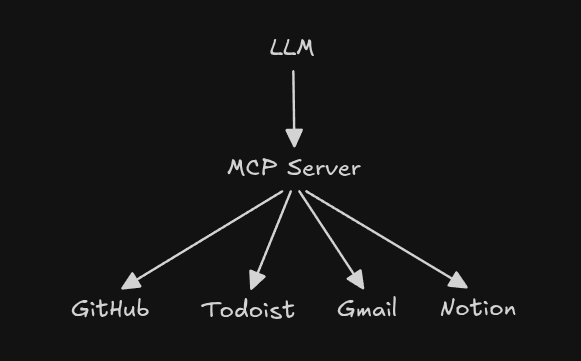
MCP is an open protocol introduced by Anthropic, and is now widely used by many external applications to provide an easy AI integration with their products.
You can read more about it here.
Memory
Now the AI is able to perform actions effectively and contact external services, but sometimes it may be useful for the model to have persistent memory: To remember user preferences, define its own “personality”, and learn from its mistakes.
There are many forms of memory. These solutions can range anywhere from a single Markdown file injected before the user’s prompt, to full context-aware database and library systems.
For example, a file-based memory system could be as simple as:
def load_memory():
  try:
    with open("MEMORY.md") as f:
      return f.read().strip()
  except FileNotFoundError:
    return ""

memory = load_memory()
messages = [{
  "role": "system",
  "content": f"You are a helpful assistant. Long-term memory: {memory}"
}]
The AI could then edit its own memory as needed using the bash tool we created earlier.
For more advanced options, there are pre-made solutions available like Honcho, mem0, and Holographic, for example.
Cron
Finally, to create an autonomous AI agent, the LLM needs to be able to schedule and repeat tasks. This could be used to, for example, produce a news briefing every day, maintain and update a computer on a weekly basis, or set reminders.
Once again, the best solution depends on the agent, the system it is running on, and the goals it is designed to achieve, but since most systems already have a scheduler (cron), we can take advantage of that:
import subprocess

tools = [{
  "type": "function",
  "function": {
    "name": "add_cron",
    "description": "Add a cron job to the user's crontab.",
    "parameters": {
      "type": "object",
      "properties": {
        "schedule": {
          "type": "string",
          "description": "Cron schedule, e.g. '0 9 * * *'",
        },
        "command": {
          "type": "string",
          "description": "Command to run on that schedule.",
        },
      },
      "required": ["schedule", "command"],
    },
  },
}]

def add_cron(schedule, command):
  line = f"{schedule} {command}"

  current = subprocess.run(
    "crontab -l 2>/dev/null",
    shell=True,
    text=True,
    capture_output=True,
  ).stdout

  if line in current:
    return "Cron job already exists."

  new_cron = current.rstrip() + "\n" + line + "\n"

  subprocess.run(
    ["crontab", "-"],
    input=new_cron,
    text=True,
    check=True,
  )

  return f"Added cron job: {line}"
With this solution, the agent is able to schedule commands for the current user, with a minimum interval of 1 minute. More robust agents such as Hermes and OpenClaw have their own cron system, and are capable of either running commands directly, or calling themselves.
Choosing an Agent
There are hundreds of options at the time of writing, each with its own set of features, but the base behind them is always the same. To choose your own, first decide what you will need the agent for. Coding agents often need to run on the developer’s machine, but tend to lack cron, memory, or more complex agentic features. Multi-purpose agents like Hermes are able to control web browsers, message the user directly, spawn multiple sub-agents, find and create their own skills, etc. As a rule of thumb, first decide which capabilities the agent must have, and then pick the most appropriate harness to control it, or create your own.